
Video Effects
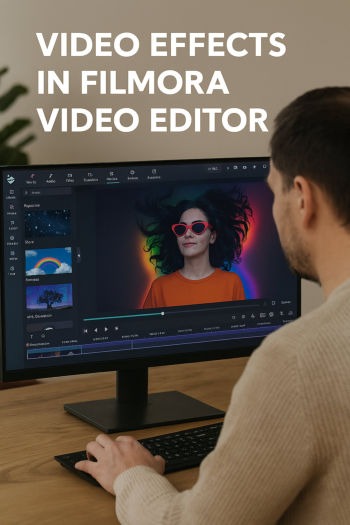
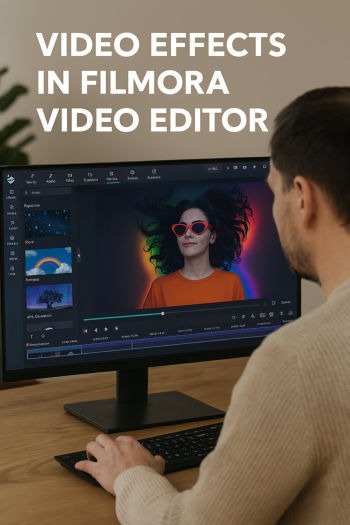
Unlock your Creativity with Filmora Video Editor with over 14,000+ Stunning Video Effects to transform your Footage into Cinematic Magic. Edit, Enhance, and Amaze with just a few mouse clicks!

What Are Video Effects?
Video effects are visual or audio enhancements applied to a video clip to change its appearance, mood, or storytelling impact. Think of them as digital “makeup” or “filters” for your footage. For example, you can make a video look old and grainy like a 1970s film, add sparkles to a birthday clip, or blur out someone’s face for privacy. Effects can be subtle, like adjusting brightness, or dramatic, like turning a scene into a cartoon. They help ordinary footage look polished, professional, or creative. In simple terms, video effects are tools that let you transform raw video into something more engaging, entertaining, or cinematic. Without effects, videos may look flat or uninteresting, but with them, you can tell stories more vividly, highlight emotions, and grab attention. Filmora_Video_Editor makes this process beginner‑friendly, offering over 14,000+ ready‑made video effects that you can apply with just a few clicks. One such tight-rope walking video effect is elaborated in the video shown above.
Why Video Effects Matter
Imagine watching a movie without any video effects like color correction, transitions, or sound enhancements. It would feel unfinished. Video effects matter because they elevate the viewing experience. They can set the mood (dark tones for suspense, bright tones for joy), guide the audience’s focus (zooming into a subject), or simply add fun (like animated emojis floating across the screen). For content creators on YouTube, Instagram, or TikTok, effects are essential for standing out in crowded feeds. Even casual users benefit: adding a slow‑motion effect to a wedding dance or a retro filter to old family footage makes memories more special. In marketing, effects can make ads more persuasive by visually reinforcing the message. Essentially, video effects bridge the gap between raw footage and storytelling. They transform everyday clips into professional‑looking productions, making them more enjoyable and impactful for viewers. Filmora_Video_Editor simplifies this by offering drag‑and‑drop video effects which anyone can use without any video editing experience.
Filmora Video Effects Library
Wondershare Filmora is known for its massive library of more than 14,000 video effects. These include filters, overlays, transitions, animations, and sound effects. You don’t need advanced editing skills; Filmora’s effects are designed for beginners and professionals alike. Categories range from essentials like blur, mosaic, and denoise, to creative ones like glitch, retro, and cinematic overlays. There are seasonal packs for holidays (Christmas, Halloween, New Year), thematic packs for travel or gaming, and even professional‑grade effects through collaborations with NewBlue FX and Boris FX. This means you can achieve Hollywood‑style results without complex software. The Filmstock library, integrated into Filmora, lets you download both free and premium video effects. Whether you want to make a vlog more stylish, a corporate video more polished, or a personal clip more fun, Filmora’s effects library has something for every scenario. It’s like having a toolbox full of creative gadgets at your fingertips.
Types of Basic Video Effects in Filmora
Filmora offers a wide range of basic video effects that beginners often use first. These include:
Filters: Adjust the color tone of your video, like sepia, black‑and‑white, or cinematic teal‑orange.
Overlays: Add textures or graphics on top of your video, such as light leaks or film grain.
Transitions: Smoothly move from one clip to another with wipes, fades, or zooms.
Text Effects: Stylish titles, captions, and animated text to make your video more informative.
Motion Effects: Pan and zoom to create dynamic movement in still footage.
These basic video effects are the foundation of Filmora video editor. They don’t require much effort but instantly make your video look more professional. For example, adding a fade‑in transition at the start of a clip makes it feel polished, while a filter can change the entire mood of a scene. Filmora makes these video effects easy to apply with drag‑and‑drop simplicity.
Advanced Video Effects in Filmora
Beyond the basics, Filmora video editor provides advanced video effects for users who want more creativity. These include:
Green Screen (Chroma Key): Replace a background with any image or video, like placing yourself in Paris or outer space.
Split Screen: Show multiple videos playing simultaneously in different sections of the screen.
Keyframing: Animate objects or text by controlling their movement frame by frame.
Masking: Cut out parts of a video to create unique shapes or highlight specific areas.
Audio Effects: Add echo, reverb, or distortion to sound for dramatic impact in addition to video effects.
These advanced tools allow for storytelling beyond simple edits. For instance, a travel vlogger can use split screen to show two destinations side by side, while a gamer can use green screen to overlay themselves onto gameplay footage. Filmora balances power with simplicity, so even complex video effects are accessible to non‑experts.
Special Video Effects Packs
Filmora video editor regularly releases themed video effects packs through its Filmstock marketplace. These packs are designed for specific occasions or genres. Examples include:
Holiday Packs: Christmas snow overlays, Halloween spooky filters, Valentine’s romantic animations.
Travel Packs: Animated maps, postcard‑style transitions, and adventure‑themed filters.
Gaming Packs: Glitch effects, neon overlays, and dynamic transitions for fast‑paced content.
Business Packs: Clean titles, infographic animations, and professional transitions for corporate videos.
These video effects packs save time because they’re pre‑designed for particular themes. Instead of manually creating video effects, you can apply them instantly to match your video’s purpose. For example, adding a video effect like falling snowflakes to a holiday greeting video takes seconds. Filmora marketplace ensures you always have fresh, trendy video effects to keep your content engaging. This is especially useful for creators who post regularly and want variety without spending hours designing custom effects.
Practical Uses of Video Effects
Video effects aren’t just about looking cool. In fact, video effects serve practical purposes. For example:
Privacy: Mosaic or blur effects can hide faces or sensitive information.
Correction: Denoise and color correction fix poor lighting or shaky footage.
Focus: Zoom or highlight effects draw attention to key details.
Storytelling: Retro filters can evoke nostalgia, while glitch effects suggest chaos or tension.
Engagement: Animated text and emojis keep viewers entertained on social media.
Filmora video effects make these practical uses accessible to everyday users. A teacher can blur student faces in a classroom video, a marketer can highlight product features, and a family can enhance home videos with fun overlays. The versatility of video effects means they’re not limited to professionals; they are tools anyone can use to improve communication and creativity.
Filmora vs. Other Editors
Compared to other professional editors, Filmora video editor is more beginner‑friendly. Filmora is more visually driven than with a complicated menu like most other video editors, which makes Filmora video editor easy to learn. While the video effects in these video editors offer deeper customization, they require steep learning curves. On the other hand, Filmora balances simplicity with power by offering ready‑made video effects that don’t need technical expertise. Its drag‑and‑drop interface is intuitive, and the Filmstock library ensures that you have thousands of options without designing from scratch. For casual creators, Filmora is ideal because it saves time and effort. Professionals may still use Filmora for quick projects or social media content. The collaboration with NewBlue FX and Boris FX also bridges the gap, giving Filmora users access to effects usually reserved for high‑end editors. In short, Filmora democratizes video effects, making them accessible to anyone who wants polished results without spending months learning complex software.
Conclusion
Video effects are the secret ingredient that transforms ordinary footage into extraordinary stories. They enhance mood, correct flaws, and add creativity. Filmora video editor stands out by offering a massive library of more than 14,000 video effects, ranging from basic filters to advanced tools like green screen and keyframing. With themed video effects packs, professional collaborations, and a user‑friendly interface, Filmora video editor makes video editing accessible to beginners while still being powerful for professional users. Whether you’re making a family video, a YouTube vlog, a corporate presentation, or a holiday greeting, Filmora video effects help you achieve polished, engaging results quickly. The key takeaway is simple: video effects are like digital magic wands, and Filmora video editor gives you more than 14,000 video effects, to bring your ideas to life.