
Create Stunning Professional Video without Expensive Gear
Learn how to create a professional video without expensive gear using Wondershare Filmora Video Editor. Enhance your footage with advanced tools like Topaz AI Starlight and achieve cinematic quality effortlessly. Perfect for beginners and budget creators.
FILMORA
7 min read
Create Professional Videos Without Expensive Gear
Create stunning professional videos without expensive gear using Wondershare Filmora Video Editor. Enhance footage with Topaz AI Starlight, fine-tune brightness using curves, and apply AI Relight for studio lighting. Add ambient neon backgrounds, focus lighting on people, shape faces with directional light, and sharpen every detail, effortlessly turning simple clips into Cinematic Masterpieces.
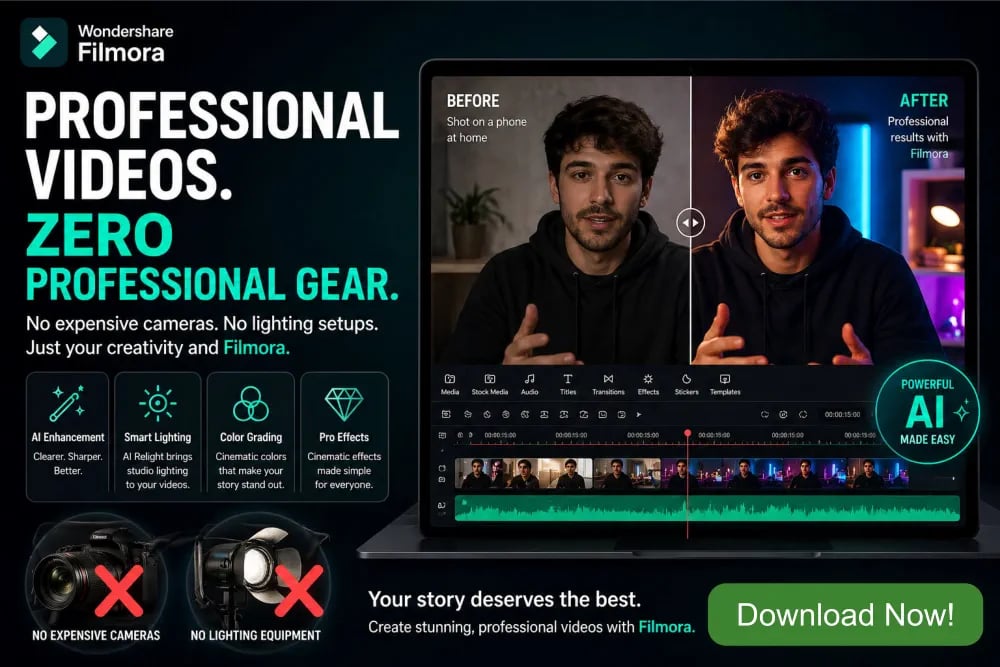
How to Create Professional Videos without Expensive Gear
Create stunning, professional videos without any type of expensive gears by using Wondershare Filmora Video Editor. With smart enhancements inspired by tools like Topaz AI Starlight, you can elevate every frame effortlessly. Fine-tune brightness and contrast using intuitive Curves, then transform flat footage with AI Relight for studio-quality illumination. Add vibrant ambient neon background lights to create cinematic depth, while applying selective lighting to highlight people and faces only, keeping your subject sharp and engaging. Directional lighting tools sculpt facial features, adding realism and dimension, and built-in sharpening refines every detail for a crisp, polished finish. Whether you're a beginner or creator on a budget, Filmora empowers you to produce visually striking videos that look like they were made with expensive gear, fast, easy, and incredibly professional.

Watch video below on how to create professional videos without any expensive gear, using Wondershare Filmora Video Editor.
Create Professional Video Without Expensive Gear
In today’s fast-moving digital world, creating professional video no longer requires a studio packed with costly cameras, lighting rigs, and editing suites. With Wondershare Filmora video editor, anyone, from beginners to seasoned creators—can transform simple footage into cinematic masterpieces. Imagine shooting a video on your smartphone in your bedroom and turning it into something that looks like it came straight out of a high-end production house. That’s the power Wondershare Filmora puts in your hands. It combines intuitive controls with powerful AI-driven tools, allowing you to enhance visuals, adjust lighting, and refine details effortlessly. Whether you're a YouTuber, marketer, or storyteller, Filmora eliminates the barrier of expensive gear and replaces it with creativity and smart editing. This guide walks you through how to achieve professional video results step by step using Filmora’s standout features.
Enhancing Low-Light Footage with AI Precision
Low-light footage is one of the biggest challenges for creators without professional lighting setups. Grainy visuals, noise, and lack of detail can ruin an otherwise great shot. This is where Filmora video editor, combined with techniques inspired by Topaz AI Starlight, becomes a game-changer. Within Filmora, you can enhance darker scenes by increasing exposure, reducing noise, and restoring lost details. For example, imagine filming a vlog at night with only a streetlight nearby. Instead of discarding the footage, Filmora allows you to clean it up, making the subject clearer and the scene more vibrant. AI-powered adjustments intelligently balance brightness and contrast, ensuring your video looks natural rather than overprocessed. This means you don’t need expensive lighting setups, just smart editing. The result is footage that feels polished and professional video, ready for any platform.
Mastering Brightness and Contrast with Curves
One of the most powerful yet underrated tools in Filmora video editor is the Curves adjustment feature. It allows you to fine-tune brightness and contrast with precision, giving your footage a cinematic look. Instead of relying on basic sliders, curves let you control shadows, midtones, and highlights independently. For instance, if your video looks flat and dull, you can create a subtle S-curve to boost contrast and add depth. Imagine filming a product review on your desk. With curves, you can brighten the product while maintaining darker, richer shadows in the background, instantly elevating the visual appeal. This technique mimics the color grading used in professional video making. The beauty of Filmora is that it simplifies this advanced process, making it accessible even to beginners. With just a few adjustments, your video can go from amateur to studio-quality without any additional equipment.
Transforming Lighting with AI Relight
Lighting can make or break a video, but setting up professional lighting equipment is expensive and time-consuming. Filmora’s AI Relight feature changes everything by allowing you to adjust lighting after recording. You can reposition virtual light sources, control intensity, and even change the direction of light on your subject. For example, if you filmed an interview with poor lighting from one side, AI Relight can balance it out, making the subject evenly lit and visually appealing. This tool is especially useful for creators who shoot in uncontrolled environments, such as home offices or outdoor locations. Instead of worrying about perfect lighting conditions, you can focus on capturing the moment and fix the lighting later in Filmora. The result is a professional video with studio-like appearance achieved entirely through software, saving both time and money.
Creating Cinematic Atmosphere with Ambient Neon Lights
Modern videos often feature stylish lighting effects that add personality and mood. Filmora video editor allows you to recreate this trend using ambient neon background lights. These effects can transform a plain setting into a visually striking environment. For instance, imagine recording a tech review in a simple room. By adding subtle neon accents in blue or purple tones, you can create a futuristic, high-tech vibe that enhances your content. These lighting effects are fully customizable, allowing you to adjust color, intensity, and placement. The best part is that you don’t need physical LED lights or expensive setups. Wondershare Filmora has built-in tools let you achieve the same effect digitally. This feature is perfect for YouTubers, gamers, and content creators who want their videos to stand out. It adds depth and style, making your content more engaging and visually memorable.
Highlighting Subjects with People-Only Lighting
One of the secrets of professional video is directing the viewer’s attention to the subject. Filmora video editor makes this easy with its ability to apply lighting specifically to people while leaving the background untouched. This selective lighting technique ensures that your subject remains the focal point of the video. For example, in a tutorial video, you can brighten the presenter while keeping the background slightly dim. This creates a clean, professional video that guides the viewer’s focus naturally. Without this feature, achieving such an effect would require multiple lights and careful setup. Filmora simplifies the process by using AI to detect and enhance subjects automatically. This not only saves time but also ensures consistent results. Whether you’re filming interviews, vlogs, or presentations, this feature helps you achieve a polished, professional video appearance effortlessly.
Adding Depth with Directional Lighting
Flat lighting can make videos look lifeless and uninteresting. Directional lighting, on the other hand, adds depth and dimension, making subjects appear more dynamic. Filmora video editor allows you to simulate directional light, shaping how light falls on your subject. For instance, you can create a soft light coming from the side to highlight facial features and add subtle shadows. This technique is widely used in professional video, photography and filmmaking to create a three-dimensional effect. Imagine recording a talking-head video. By adding directional light, you can emphasize facial contours, making the subject look more defined and engaging. Filmora’s controls are simple yet powerful, allowing you to experiment with different lighting angles until you achieve the desired effect. This feature helps you replicate studio-quality lighting without any physical equipment, giving your videos a cinematic edge.
Sharpening Details for a Crisp Finish
No professional video is complete without sharp, clear visuals. Wondershare Filmora has sharpening tools that allow you to enhance details and bring out textures in your footage. This is especially useful for videos shot on smartphones, which may lack clarity compared to high-end cameras. For example, in a product showcase, sharpening can highlight fine details, making the product look more appealing. However, the key is to use this feature subtly. Over-sharpening can make footage look unnatural, but Filmora video editor provides precise controls to maintain a balanced look. By combining sharpening with other enhancements like brightness and contrast adjustments, you can achieve a polished, professional video finish. This ensures your videos look crisp and high-quality, even when shot with basic equipment.
Elevating Storytelling with Color Grading
Beyond basic adjustments, Filmora video editor offers advanced color grading tools that allow you to define the mood and tone of your video. Whether you want a warm, inviting look or a cool, dramatic atmosphere, color grading helps you achieve it. For instance, a travel vlog can benefit from vibrant, saturated colors that highlight scenic landscapes, while a cinematic short film might use muted tones for a more dramatic effect. Filmora’s presets and manual controls make it easy to experiment with different styles. This level of customization ensures your videos stand out and convey the intended idea effectively. With Filmora, you don’t just edit videos, you craft visual stories that resonate with your audience.
Streamlining Workflow with User-Friendly Tools
One of the biggest advantages of Filmora video editor is its user-friendly interface. Unlike complex editing software, Filmora is designed to be intuitive and accessible. This means you can focus on creativity rather than struggling with technical details. Features like drag-and-drop editing, pre-built templates, and real-time previews make the editing process smooth and efficient. For example, a beginner can quickly assemble clips, add effects, and export a finished video without prior experience. This ease of use doesn’t come at the cost of power, Filmora video editor still offers advanced tools for professionals. This balance makes it an ideal choice for anyone looking to create high-quality professional video without investing in expensive gear or spending months learning complicated software.
Real-World Example: From Simple Setup to Stunning Video
Imagine you’re a small business owner creating a promotional video for your product. You don’t have a studio or professional video equipment, just a smartphone and a basic setup at home. With Filmora video editor, you can shoot your footage and then enhance it using the techniques discussed. Start by improving low-light scenes, adjust brightness with curves, and use AI Relight to create balanced lighting. Add ambient neon effects to give your video a modern look, highlight the product with selective lighting, and sharpen details for clarity. The final result is a professional video that rivals those produced with expensive equipment. This demonstrates how Filmora empowers creators to achieve outstanding results with minimal resources.
Why Wondershare Filmora Is the Ultimate Choice
At its core, Wondershare Filmora is more than just a video editor, it’s a complete creative solution. It bridges the gap between imagination and execution, allowing anyone to produce professional video without expensive gear. Its combination of AI-powered tools, intuitive design, and powerful features makes it a standout choice in the world of video editing. Whether you’re creating content for social media, business, or personal projects, Filmora video editor provides everything you need in one platform. It simplifies complex processes, enhances visual quality, and helps you tell compelling stories. With Filmora, the only limit is your creativity. Start creating today and تجربه the freedom of producing stunning videos without breaking the bank.